
An AI prompt is a work order. Hand a sharp new hire one line of instruction and no background, and you get a guess. AI tools work the same way. Many weak answers come from missing context, not a weak model.
The reason is simple. A tool knows two things: what it learned in training and what sits in front of it right now. Training is general and stops at a cutoff date. Your client, your engagement letter, your firm's tone and this week's facts are not in it. Unless you put them in the prompt, the tool fills the gap with the most likely words.
This applies to ChatGPT, Microsoft Copilot, Claude and Gemini. For prompts you can copy and send, read the practical companion, How to Get the Most From Your Website Agent: 34 Prompts to Copy.
The short version
- A prompt is everything you give a tool for one answer, not just the question.
- Seven parts cover it: role, task, context, examples, constraints, output format and a check step.
- The model knows only its training and what is in the context window.
- Relevant beats long. Extra material can bury the facts that matter.
- Keep client-confidential data out of any tool your firm hasn't approved.
What are the seven parts of a prompt?
A prompt has seven parts: role, task, context, examples, constraints, output format and a check step. A clear task is the minimum. Add the rest as the stakes rise. The examples below are illustrations, not client stories.
The vendors name the parts differently. Microsoft's Copilot guide lists a goal, context, source and expectations. OpenAI's guide uses identity, instructions, examples and context. Google's Gemini guide covers instructions, constraints, response format, examples and added context. The labels differ. Every guide gives context its own heading.
- Role: who the tool should be. One sentence sets the voice and the level. Anthropic's guide says even a single sentence makes a difference. Law: "You are a paralegal at a Dallas estate planning firm, drafting for attorney review." A role changes the voice. It adds no knowledge.
- Task: the one job. Name the deliverable and the action. "Summarize this" invites a guess. "Draft a 150-word summary of the attached lease for a non-lawyer" doesn't. Anthropic's guide says to think of the tool as a brilliant but new employee who lacks context on your norms and workflows. CPA: "Draft an email asking the client for the three missing documents."
- Context: the facts, the reader and the reason. Say who the output is for and why you need it. Anthropic's guide contrasts the bare rule "never use ellipses" with the same rule plus its reason: the response will be read aloud by a text-to-speech engine that can't pronounce them. It says the tool can generalize from the explanation. Wealth: "The reader is a retired client, nervous about market swings, who likes short emails."
- Examples: show what good looks like. Anthropic calls examples one of the most reliable ways to steer format, tone and structure and suggests three to five. Google warns that too many can make the model copy them too closely. Law: paste two past replies with the names removed and say "match this tone."
- Constraints: what to include, avoid and never do. Google's guide says to tell the model what to do and what not to do. CPA: "Give no tax position. Quote no figures. Say we will confirm with the preparer."
- Output format: the shape of the answer. Name a table, a list, a paragraph or a word count. Wealth: "Three bullets for the client, then one question for the advisor to ask."
- Check step: make it test its own work. Anthropic suggests ending with "Before you finish, verify your answer against" your criteria. Microsoft tells Copilot users to review and verify responses, because they can include incorrect content. Law: "List every statement you could not support from the attached documents."
A role changes the voice. Context supplies the facts.
The check step doesn't replace your review. You still sign the work. For what professional rules expect, read Legal AI Can Hand You a Research Plan, First Draft and Citation Check. You Still Have to Stand Behind Them.
What is a context window, and why does it matter?
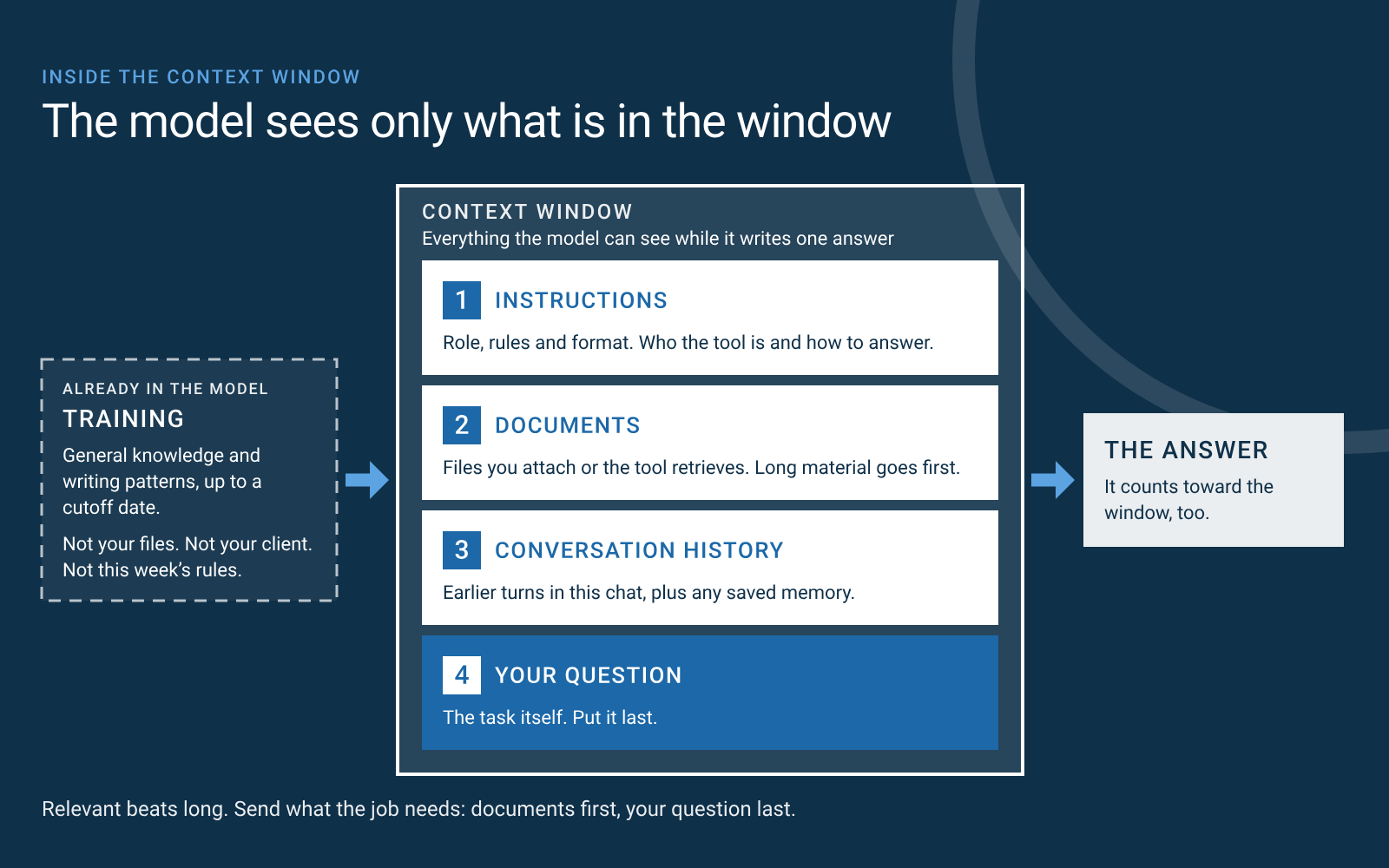
The context window is everything a model can see while it writes one answer: your instructions, attached documents, the conversation so far, your question and the answer itself. Anthropic's documentation calls it the model's "working memory" and says it is different from the data the model was trained on. If a fact isn't in the window or in training, the model doesn't have it. A better model still can't see what you left out. Anthropic's engineering team writes that smarter models need less prescriptive engineering, but that treating context as a precious, finite resource will remain central.
What does the model know before you type a word?
It knows what it absorbed in training: broad language patterns and general knowledge, up to a cutoff date. Training doesn't include your files, your client, a rule that changed last month or your firm's style. Google's guide shows what that costs. It asks a model what to do about a Google Wifi router with a slowly blinking yellow light and gets generic troubleshooting. The guide then adds the router's own troubleshooting text and asks again. The answer now matches the router: check the Ethernet cable between the router and the modem. Same model. Different context.
How does context get in front of the model?
Context arrives from six places. Only the first is out of your hands.
| Where it comes from | What it supplies | Watch for |
|---|---|---|
| Training | General knowledge and writing patterns, up to a cutoff date | Out of date, and knows nothing about your firm |
| Your prompt | Instructions, background and pasted text. A client's situation in three sentences. | Only what you type counts |
| Attached documents | The exact text of a file. A blank engagement letter or your style guide. | Long files crowd the window |
| Retrieval | Passages the tool looks up from connected files or the web. Your shared drive. | It can pull the wrong file. Check which files it used |
| Conversation history | Earlier turns in this chat. Your correction from five messages ago. | Wrong turns ride along |
| Memory | Details saved from past chats. "Prefers short emails." | Can be stale. Review and edit it |
Retrieval is how a tool finds the right pages before it answers. OpenAI calls adding relevant material to a request retrieval-augmented generation, or RAG. It gives the model data outside its training and limits answers to sources you choose. Microsoft 365 Copilot works this way at the office. It connects to your Microsoft 365 apps and data, and Microsoft says it surfaces only organizational data the user already has permission to view. The tool looks things up and reads them like text in your prompt.
Memory is context saved from earlier chats. OpenAI's help center says ChatGPT can remember preferences and details and decides which are relevant to a response. Anthropic's help center describes memory for Claude too. Both let you review, correct or turn it off.
Why does more context sometimes make answers worse?
Because the window is working memory, not a filing cabinet. Anthropic's documentation says more context isn't automatically better. As the amount of text grows, accuracy and recall degrade, a problem it calls context rot. A peer-reviewed study that tested models from 2023, "Lost in the Middle," found that performance is often highest when the relevant information sits at the beginning or end and degrades significantly when it sits in the middle.
So send what the task needs, and order it well:
- Attach the section, not the binder. Give it the relevant pages, not the whole file.
- Put long documents first and your question last. Anthropic's guide says a question placed at the end can improve response quality by up to 30 percent in its tests, especially with complex inputs that include several documents. Google's Gemini 3 guidance says the same: context first, instructions last.
- Ask for quotes first. For long documents, Anthropic suggests having the tool quote the relevant passages before it answers. That keeps it on the text.
- Start a fresh chat when the thread wanders. Paste a short summary into the new one. Every earlier turn rides along with each new question, including the dead ends.
The new-hire test
Show your prompt to a colleague with minimal context on the job and ask them to do it. If they would be confused, the tool will be too. Anthropic's guide recommends the same check. Fix what confuses them.
How does a weak prompt become a strong one?
One step at a time, and each step closes a specific gap. Start with a prompt that looks reasonable and returns something generic:
Write an email to a client about their tax documents.
That is 10 words. The tool has to guess which documents, which client, what tone and what deadline. Here is the rebuild, as a CPA firm in Plano might do it.
- Add a role and a task. "You are a senior manager at a CPA firm in Plano, Texas. Write a reminder email asking a client for three missing documents: the 1099 from their largest customer, the December bank statement and the mileage log." Fixes: which documents.
- Add context. "The client is a sole proprietor who runs a landscaping business. They are organized but busy and read email at night. Late documents delayed their filing last year." Fixes: tone and urgency.
- Add an example. "Match the tone of this past reminder: [paste one, names removed]." Fixes: voice.
- Add constraints. "Use plain words. Don't mention fees. Give no tax position and quote no figures. Don't promise a filing date. Say we will confirm one once the documents arrive." Fixes: risk.
- Add the format. "Subject line, then under 150 words. List the three items. State one deadline: [date]." Fixes: shape.
- Add the check. "Before you answer, confirm the email names all three items and asks for nothing else. If you are missing a fact, ask me instead of guessing." Fixes: guesswork.
The finished prompt
You are a senior manager at a CPA firm in Plano, Texas. Write a reminder email asking a client for three missing documents: the 1099 from their largest customer, the December bank statement and the mileage log. The client is a sole proprietor who runs a landscaping business. They are organized but busy and read email at night. Late documents delayed their filing last year. Match the tone of this past reminder: [paste one, names removed]. Use plain words. Don't mention fees. Give no tax position and quote no figures. Don't promise a filing date. Say we will confirm one once the documents arrive. Subject line, then under 150 words. List the three items. State one deadline: [date]. Before you answer, confirm the email names all three items and asks for nothing else. If you are missing a fact, ask me instead of guessing.
The prompt went from 10 words to about 145. Nothing about the model changed. Every added word is context, and each one removes a guess.
Notice the brackets. They keep client details out of the tool, which leads to the question every firm should settle first.
How the Website Agent applies this. Every request to the Berry Buckley Website Agent works the same way: name the page, the reader, the facts and the limits, then review a preview before anything goes live. Read how it works in Your AI Agent Can Now Run Your Website.
Is it safe to paste client information into an AI tool?
Not unless your firm has approved how that tool handles data. Don't paste client-confidential material into a tool you haven't vetted. It's not a reason to avoid AI. It's a reason to know where the words go.
- Check the plan, not just the brand. Terms differ by plan. OpenAI says it doesn't use content from ChatGPT Business, Enterprise or Edu workspaces to train its models by default, while personal accounts may contribute chats to model improvement unless the setting is off. Microsoft says prompts, responses and data accessed through Microsoft Graph aren't used to train the foundation models behind Copilot. Look for training use, retention and who can see your content.
- Use placeholders. Write "[client]" and "[amount]". Strip names, account numbers and tax IDs. Put the facts back after the tool returns a draft.
- Write a one-page rule. List the approved tools and what may go into them. Memory and connected files count as input. Train your staff on it.
Lawyers have a written standard. Texas Ethics Opinion 705 says a lawyer should be reasonably satisfied that a generative AI program won't reveal confidential information or allow its use to the client's disadvantage. If the lawyer isn't, the opinion says not to enter confidential information without client consultation and consent. CPAs and wealth advisors carry their own confidentiality duties. Check your professional rules and your tool's terms before you paste.
Frequently asked questions
Is a prompt just a question?
No. A prompt is everything you give the tool for one answer: your question, instructions, background, examples and any attached material. The context around the question decides the quality of the answer.
What is a context window?
It is everything a model can see while it writes one answer: instructions, documents, the conversation so far, your question and the answer itself. Anthropic's documentation calls it the model's working memory and separates it from the data the model was trained on.
Why does AI give me generic answers?
Usually because the prompt left out what makes your situation specific. A tool with no background on your client or your reader falls back on the most common answer. Add the facts, the reader and the format.
Does a longer prompt always work better?
No. Relevant material helps. Extra material can bury what matters. Anthropic's documentation says more context isn't automatically better, and accuracy and recall can degrade as text grows. Send what the job needs, put long documents first and put your question last.
Do I need special phrases or "magic words"?
No. Clear, direct instructions work. Google's Gemini 3 guidance says to be precise and direct and to avoid unnecessary or overly persuasive language. Spend the effort on the facts, the limits and the format instead.
Can I paste client documents into ChatGPT, Copilot, Claude or Gemini?
Only in a tool your firm has approved for client data, under terms you have read. Terms differ by plan. Use placeholders for names and numbers when you can.
See what AI can do with the right context. Book a free consultation, and you get a written brief: what we would change, what it costs or a clear no. Book your free consultation or call (972) 362-9235.
Sources
- Prompting guides: Anthropic, prompting best practices; OpenAI, prompt engineering; Google, Gemini prompt design strategies; Microsoft, get started writing prompts in Copilot.
- Context and memory: Anthropic, context windows; Anthropic, effective context engineering for AI agents; Liu et al., "Lost in the Middle: How Language Models Use Long Contexts"; OpenAI Help Center, Memory in ChatGPT; Claude Help Center, chat search and memory.
- Data handling: Microsoft Learn, Copilot privacy; State Bar of Texas, Professional Ethics Committee Opinion 705.
Drate Berry builds Berry Buckley's AI agents. He works in AI, SaaS and agent development. Berry Buckley builds AI-driven websites, workflow agents and custom tools for owner-led firms in Dallas–Fort Worth. We don't give legal, tax or compliance advice.