

Your Website Agent can do far more than fix a typo. Ask it to answer the questions clients search for, label your photos for screen readers, shrink a heavy image, sharpen a call to action or update an out-of-date bio. It builds each change on a preview, usually within minutes for routine changes. You approve it, and only then does it go live. Below: what the agent can improve, and 34 prompts to copy, fill in and send. They work for any small or midsize business. We build for law, CPA and wealth-advisor firms in Dallas–Fort Worth, so each set also has examples for them.
The skill is in the ask. A clear request, with the facts and limits stated, gets you a preview you can approve on the first look. A vague one starts a second round.
How to use a prompt
- Copy it.
- Fill in the [brackets].
- Text, chat, email or speak it to your agent.
- Review the preview. Reply with edits, or approve.
Any business prompts work as written for any company. Law, CPA and Wealth prompts show the same job in a professional-services firm.
What can your website agent do to improve your site?
Eight jobs. Each is a change to pages, copy, photos or posts, checked against your brand guide, reviewed a second time and run through standing tests before you see it.
- Keep content current. Bios, services, hours, offers and posts match the business as it is today. Google asks for helpful, reliable, people-first content and says trust is the most important part of E-E-A-T.
- Make pages easy for search and AI answers to use. Answer-first copy, clear page titles and descriptions, internal links and FAQs. Google says the same SEO fundamentals apply to AI Overviews and AI Mode, with "no additional requirements" for either.
- Make the next step easy to take. Clearer calls to action, a page order that follows how people decide and plain form labels.
- Show who you are. Author bios, credentials, a "how we work" page and reviews you have approved. Google asks "Who, How, and Why" about a page and names author and About pages as signs of expertise.
- Fix accessibility. Alt text on images (WCAG 1.1.1), text contrast of at least 4.5:1 for normal text (1.4.3), headings that describe their section (2.4.6) and a label on every form field (3.3.2).
- Tune speed. Right-sized images in modern formats, dimensions set so the page doesn't jump and no lazy loading on the top image. web.dev's targets: largest element loaded within 2.5 seconds, interaction response of 200 milliseconds or less, layout shift of 0.1 or less.
- Hold the brand. Each edit follows the same brand guide.
- Get ready for agent visitors. Chrome's guidance says AI agents read a page's accessibility tree to find buttons and forms, and that missing labels can block them. Clear labels help your visitors and the agents working for them.
A good request is a short brief: the page, the reader, the facts and the limits.
We run our own site this way. Since launch in October 2026, more than 20 changes to berrybuckley.com have gone through preview and approval, as of November 18. Read How We Rebuilt Our Own Website, and Why an Agent Runs It Now.
What stays off limits
The agent changes pages, copy, photos and posts. It doesn't touch your domain, email settings or payments. Nothing goes live until you approve it, and each change can be undone. See what the Website Agent does.
What should you ask it? A prompt library by job
Every prompt ends by asking for a preview. Replace each [bracket] with your own details, and paste in the facts. The agent should never guess your fees, credentials or results. Your monthly change allowance covers routine edits to what's already on your site. Larger work is quoted, and if you're not sure which one a request is, ask, and we'll tell you before we start. Most prompts below cover one page or one section. Larger changes may be quoted.
A note for regulated firms
You approve every preview, so the words are yours. The Texas Disciplinary Rules bar false or misleading communications about a lawyer's services, and the SEC's Marketing Rule sets conditions for investment advisers' testimonials and endorsements. Run the agent's copy through your own review. We don't give legal, tax or compliance advice.
1. Keep content current
- Any business · Refresh a page. Review my [services / pricing / team] page for anything out of date. Change only these items: [list]. Keep my tone and layout. Add nothing I didn't give you. Show me a preview.
- Any business · Publish a post. Write a post titled [title] for [your ideal customer]. Use only my notes below. Open with the answer in two sentences, add three short FAQs and link to my [service] page. Notes: [paste]. Show me a preview.
- Law · Add an attorney. Add [name], [title], to the team page and my [practice area] page. Use the headshot [file name] and the bio below. Match the other profiles, and state bar admissions only as I wrote them. Bio: [paste]. Preview first.
- CPA · Filing-season notice. Add a one-line notice to my home page and [tax preparation] page: [notice, with dates]. Match the brand guide. I'll ask you to remove it when the season ends. Preview on a phone and a laptop.
2. Make pages easy for search and AI answers to use
- Any business · Title and description. On my [service] page, rewrite the page title and meta description for someone in [city] searching for "[exact phrase]". Say what the page offers and who it's for in plain words, with no repeated keywords. Keep the title under 60 characters and the description under 155, and end the title with my business name. Keep [brand term] in the title. Update the page's structured data to match. Leave the body alone. Preview.
- Any business · Answer first. On my [service] page, rewrite the first two sentences so they directly answer "What is [service], and who is it for?" Keep every other paragraph as it is. Preview.
- Any business · Real FAQs. Add a short FAQ to my [service] page for these customer questions: [3 to 5 questions]. Answer each in two or three sentences, using only these facts: [paste]. Preview.
- Law · Local practice-area section. On my [estate planning] page, add a section for people in [Plano, Frisco, McKinney]: who we help, what happens first, how to reach us. Use only the facts below, promise no results and link to my [probate] page. Facts: [paste]. Preview.
- CPA · Link your pages. Larger job: may be quoted Find pages that mention [S-corporation tax planning] and link them to my [business tax] page where it fits. Use descriptive link text, never "click here." List each page you changed. Preview.
3. Make the next step easy to take
- Any business · One clear next step. On my [home / service] page, make the main call to action "[Book a free consultation]." Put it at the top, after the first section and at the end. Remove competing buttons. Change nothing else. Preview on a phone.
- Any business · Plain forms. Rewrite the help text on my [contact] form so each field says plainly what to enter and why we ask. Use these reasons: [paste]. Tell me which fields look unnecessary, but don't remove any. If this form appears on more than one page, show me a preview on two of them.
- Any business · Page order. Reorder my [service] page: who it's for, what they get, how it works in three steps, how to start. Reuse my text. Make each subhead a question a customer would ask. Preview.
- Law · What happens on the first call. On my [family law] page, add a short "What happens when you call" section with these steps: [three steps]. Keep the tone calm and plain, and promise no outcomes. Preview.
- Wealth · Your first meeting. Add a "Your first meeting" section to my home page covering [what to bring, how long it takes, what we discuss, what it costs]. Use only these facts. Preview.
4. Show who you are
- Any business · Meet the owner. Rewrite the first paragraph of my About page: who runs the business, how long we've served [your customers] and one thing we're known for. Use only these facts: [paste]. Under 80 words. Preview.
- Any business · Reviews page. Add these customer reviews to a Reviews page: [paste, with names and permission confirmed]. Keep each one word for word. Don't edit, combine or add any. Preview.
- CPA · How we work. Add a "How we work" page at /how-we-work with these steps: [your steps from first call to filed return]. For each step, name who does it and their credentials exactly as I wrote them: [list]. Use only these facts. Add a link from the home page at [where]. Show me a preview of the page and of the home page.
- Wealth · Required disclosure. Larger job: may be quoted Add this disclosure to the footer of every page and to my [investment services] page: [exact text]. Don't change a word. Check the footer on a phone and a laptop. Show me a preview.
If a fact is missing from the "How we work" prompt, the agent should stop and ask instead of inventing it.
5. Fix accessibility
- Any business · Alt text. Check every image on my [home / services] page. Write alt text that says what the image shows and why it's there. Mark purely decorative images as decorative. Preview.
- Any business · Headings. On my [service] page, check the headings: one H1, then H2s that describe each section. Rewrite vague ones such as "Overview" to say what the section covers. Preview.
- Any business · Contrast. Check text and button contrast on my [home] page against 4.5:1 for normal text, and include text over images and hover and focus states. Where it falls short, adjust within my brand guide colors. If no brand color passes, tell me instead of picking a new one. Tell me if a fix lives in a shared part of the site that changes other pages. Preview.
- Law, CPA or Wealth · Intake form. On my [intake] form on my [contact] page, check every field has a visible label, plain help text under it and "(required)" or "(optional)" in the label, not color alone. Don't rename or remove fields. Tell me which forms you changed. Show me a preview.
The form prompts in jobs 3 and 5 can run together.
6. Speed up the site
- Any business · Heavy images. Find the largest images on my [home] page. Tell me each one's file size and the size it's shown at. Resize each to no more than twice its shown width, and use WebP or AVIF where the photo allows. If the page has no large photos, say so. Give me before-and-after file sizes and a preview.
- Any business · No page jump. Make sure every image and embed on my [service] page has its width and height set, so the page doesn't jump while loading. Tell me if a fix lives in a shared part of the site that changes other pages. Preview.
- Any business · Top image. On my [page], make sure the image at the top of the first screen isn't lazy-loaded and the ones below it are. Check at phone and laptop widths. If the page has no large image, say so and tell me which pages do. Show me a preview.
- Law, CPA or Wealth · Headshots. On my [team] page, rename each headshot file to first-last, for example jane-smith.jpg, and keep the old web addresses working. Check that all headshots show at the same size and crop, and add alt text where it's missing. Don't change the photos. Tell me every page that uses these photos. Show me a preview.
7. Hold the brand
- Any business · Brand pass. Review my [page] against our brand guide: colors, fonts, spacing, voice and banned words. List what doesn't match, then fix those items only. Preview.
- Any business · Match our voice. Rewrite the draft below in the voice of our brand guide and my [About] page. Keep every fact. Cut hype and filler. Draft: [paste]. Preview.
- Law · Same names everywhere. Larger job: may be quoted Make sure we call each practice area the same thing everywhere: [your names, such as "Estate Planning" and not "Wills & Trusts"]. Find variants, change them and list each page you touched. Preview.
- Wealth · Plain English. Rewrite my [page] in plain English at about an eighth-grade reading level. Keep every number, fee and disclosure exactly as written. Preview.
8. Get ready for agent visitors
- Any business · At a glance. Add a short "At a glance" block to my [home] page: what we do, who we serve, where, our hours and our phone number: [facts]. Plain text, not an image. Preview.
- Any business · Name every button. Check every button and link on my [home] and [contact] pages. Name each for what it does, such as "Book a consultation," not "Submit" or "Click here." Preview.
- Any business · Check an AI answer. I asked [ChatGPT / Gemini] "[a question a customer would ask]" and got this answer: [paste]. Compare it with my [service] page. Where my page is missing or unclear, rewrite it to give the right answer, in your own words. Preview.
- Law, CPA or Wealth · Local facts. On my [contact] page, state our address, the cities we serve [list] and our hours as text, matching the footer. Preview.
How do you write a prompt that works the first time?
Give the agent the page, the reader, the facts and the limits, then ask for a preview. Compare two requests:
Weak: "Improve our SEO."
Strong: "On my estate planning page, rewrite the page title and meta description for someone in Plano searching for an estate planning attorney. Leave the body alone. Show me a preview."
The second has one page, one reader and one result you can check in seconds. Google truncates long titles to fit the screen, so short and descriptive wins.
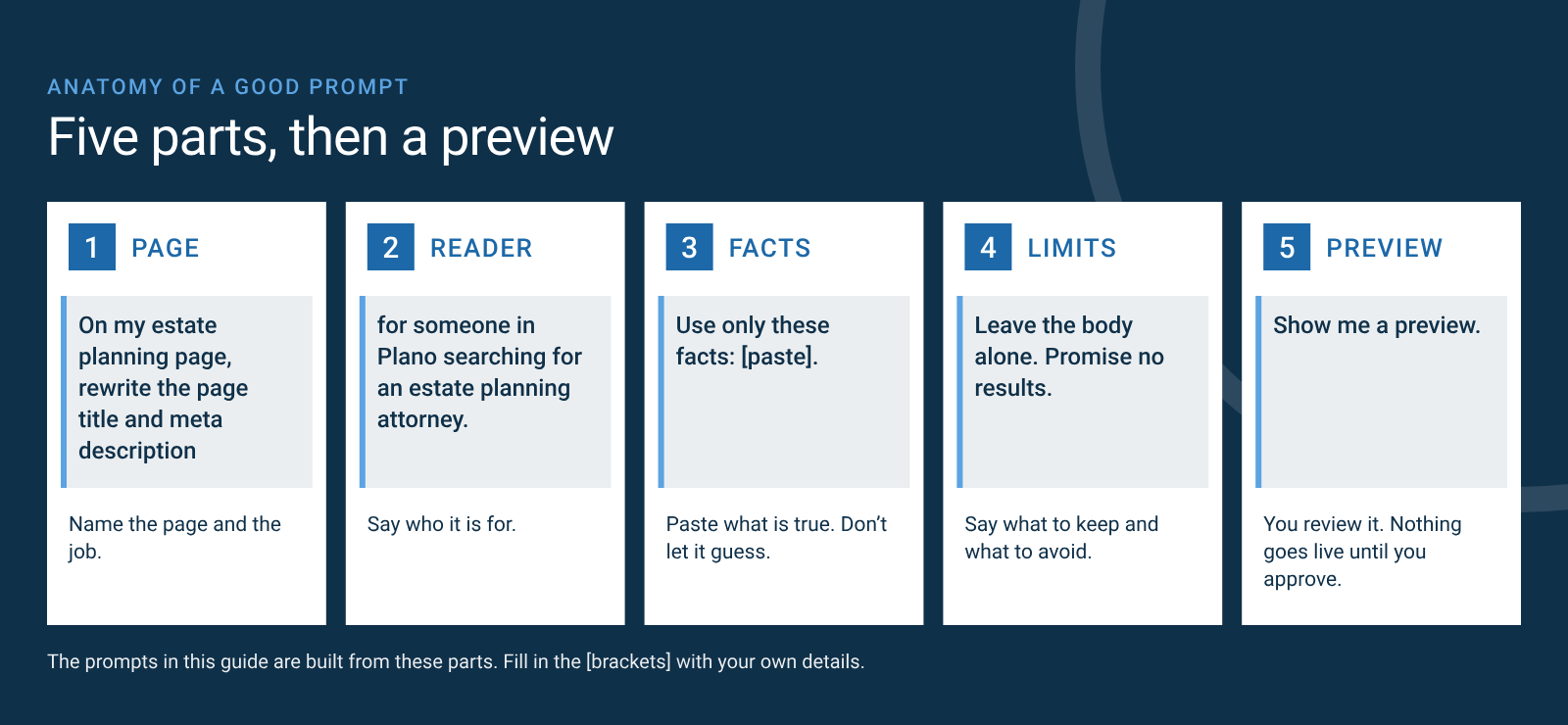
- Name the page and the reader. "My estate planning page, for someone in Plano" beats "the site."
- Paste the facts and say to use only them. Don't ask it to guess your fees, credentials or results.
- Set the limits. Length, tone, what to leave alone, words to avoid, such as "best" or "guarantee." Ask for the preview on a phone and a laptop.
- One goal per request. Related edits to one page can go together. Larger jobs, such as checking every image on your site or reorganizing the navigation, are quoted. A complete request usually needs fewer rounds, which makes your allowance go further.
- Ask where the fix lives. Some fixes sit in a shared part of the site and change other pages too. Ask the agent to tell you when that happens, before you approve.
- Ask for fewer, better pages. Google's spam policies treat mass-produced pages made to rank as scaled content abuse.
What should you ask for each month?
One short session a week, a few prompts each.
| Week | Focus | Library jobs |
|---|---|---|
| 1 | Is anything out of date? Hours, team, offers, one new post | 1, 4 |
| 2 | Would a customer find an answer? Ask an AI tool a client's question, then fix the page | 2, 8 |
| 3 | Does each page have one clear next step? | 3, 4 |
| 4 | Is the site accessible, fast and on brand? | 5, 6, 7 |
Frequently asked questions
Does the Website Agent work for any small business, or only law, CPA and wealth firms?
Any small or midsize business can use it. The prompts tagged "Any business" work as written. Berry Buckley builds for owner-led professional-services firms in Dallas–Fort Worth, so the industry examples come from law, CPA and wealth-advisor practices.
Will these prompts raise my Google ranking or get me into AI answers?
No one can promise a ranking. Google says the SEO fundamentals apply to AI Overviews and AI Mode, with no special optimizations, and that indexing and serving aren't guaranteed. These prompts target those fundamentals: clear titles, answer-first copy, internal links and accessible, fast pages.
Should I still add FAQs to my pages?
Yes, for your readers. Google stopped showing FAQ rich results on May 7, 2026, so write FAQs to answer real customer questions, not to win a search feature.
Can the agent write my reviews, testimonials or legal disclosures?
Give it the exact words and ask it to place them. Don't ask it to write reviews, results or required disclosures. Your professional advertising rules still apply.
What does my monthly change allowance cover?
Your monthly change allowance covers routine edits and simple additions: updating pages and copy, swapping photos, publishing posts, fixing titles, labels and image settings, and adding a simple new text page. Larger builds, such as new sections, features or connections to other tools, complex pages, site-wide redesigns and changes that reshape many pages at once, can still be quoted. If you're not sure which one a request is, ask, and we'll tell you before we start.
Routine, covered by the allowance:
- Change one service page's title and description.
- Swap a headshot.
- Fix contact form labels.
- Publish a post.
- Add a simple text page, such as a Reviews page.
Larger work, quoted:
- Rewrite every page's title and reorganize the navigation.
- Redesign the team section.
- Build a new intake form that sends to case-management software.
- Build a searchable resource library.
What does it cost to get started?
$2,500 moves your current site onto the agent: a basic design and UI upgrade using your existing content, plus your brand guide. Care is from $125 a month and includes changes up to your monthly change allowance. Larger work is quoted, and new content or custom work is quoted separately. Here is how the agent works and what it costs.
See your site run this way. Book a free consultation, and you get a written brief: what we would change, what it costs or a clear no. Book your free consultation or call (972) 362-9235.
Sources
- Search and AI: Google, creating helpful, reliable, people-first content; Google, AI features and your website; Google, title links; Google, spam policies; Google Search Central changelog.
- Accessibility: WCAG 2.2, Non-text Content; Contrast (Minimum); Headings and Labels; Labels or Instructions.
- Speed: web.dev, Web Vitals; web.dev, Optimize LCP; web.dev, Optimize CLS; web.dev, Choose the right image format.
- Agent visitors: Chrome, accessibility for agents.
- Professional rules: Texas Disciplinary Rules, communications concerning a lawyer's services; SEC Marketing Rule, 17 CFR 275.206(4)-1.
Paul Buckley co-founded Berry Buckley, which builds AI-driven websites, workflow agents and custom tools for owner-led firms in Dallas–Fort Worth. We don't give legal, tax or compliance advice.